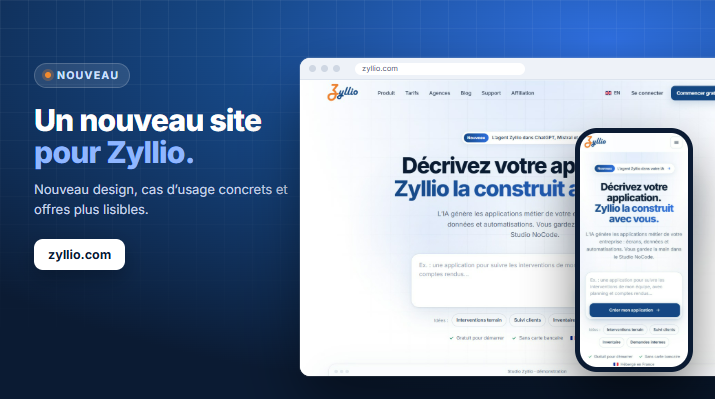
A brand-new website for Zyllio!

zyllio.com has a fresh new look 🚀

New design, new content: see how AI and the NoCode Studio let you build your company's business applications, with real-world examples, clearer plans and a detailed comparison.

Business owners, operations teams, IT departments or agencies: everyone will see how Zyllio can help them digitize their processes 👌

A brand-new website for Zyllio!

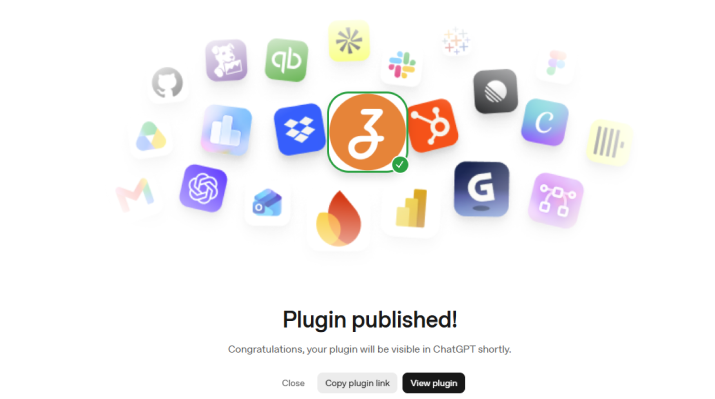
The Zyllio MCP plugin is now available in ChatGPT!

The public Zyllio MCP plugin, validated by OpenAI, lets you create and manage your Zyllio application directly from ChatGPT 🚀

Create screens and components, manage your data, then publish your PWA without leaving the conversation.

Zyllio plugin published

Let's publish a Zyllio app to the stores

In this new Zy'Stream episode, discover how to publish a no-code app to the Google Play Store and Apple App Store 🚀

Watch the video on YouTube 👌

Zy'Stream #35 - Let's publish a Zyllio app to the stores

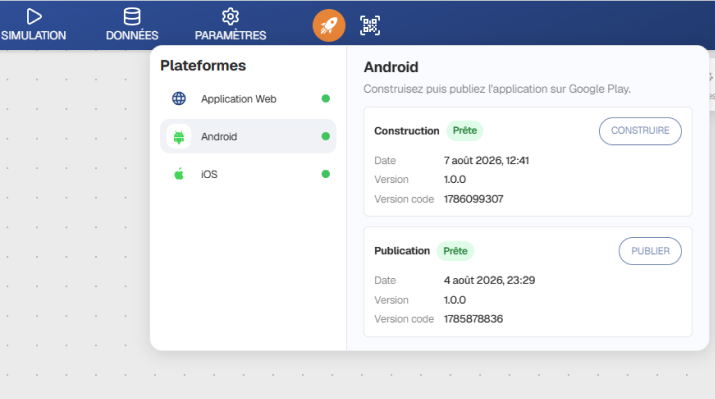
Publish to the stores!

We have finalized the integration of the Google Play Store (Android) and Apple App Store (iOS) platforms 🚀

Once configured, it only takes 1 minute to publish your app to the stores ✨

We are still looking for a 3rd client to launch a pilot, with a preferred offer at -50% 🙌

Publish to the stores!

Native automations!

Native automations are now available in Zyllio 🎉

Trigger scenarios on table updates, via webhook, or on a schedule, with conditions, loops, variables, emails, API calls, and text generation ✨

With screen design, data, and now automation in one place, Zyllio brings together the three core building blocks of a true no-code platform 🚀

Native automations!

New feature: AI !

We are evolving our Zyllio platform to make the AI assistant a true productivity booster 👏

After the component creation assistant and then the screen assistant, AI now extends to data management 👌

Thanks to no-code, every element remains customizable, adjustable, and under your control. The best of both worlds: the speed of AI + the control of no-code 👌

New feature: AI !

New: Outlook Integration!

Today, we’re announcing Outlook integration for sending emails 🚀

We’re also introducing support for file attachments on Outlook and Gmail 👌

New: Outlook Integration!

Create AI Components!

March 2026

Zyllio is making a big move with AI! 🚀

We are strengthening our vision: making custom application development faster than ever thanks to AI 👌

Simply describe what you want to create, and the platform generates a custom component ✨

Create AI Components!

1,700 New Icons!

Feb. 2026

We’ve just expanded our library with 1,700 modern icons, added to the 700 already available 👌

That’s a total of 2,400 icons to unlock even more creative possibilities ✨

1,700 New Icons!

New Component: Editable Table!

Jan. 2026

You can now directly edit any row in your tables without the back-and-forth 👌

It supports multiple field types: text, multiline text, options & colored options, checkboxes—all with Sorting and Pagination included 👍

New Component: Editable Table!

New Component: Reviews!

Dec. 2025

This component is used to collect reviews for any item: services, products, articles, posts, listings ...👌

Simple to integrate and fully customizable, it boosts engagement and builds trust within your app! 👏 🚀

New Component: Reviews!

Notification badges !

Nov. 2025

You can now display a notification badge whose value comes directly from data or a formula 👌

It’s also now possible to show or hide a screen based on a condition or the device type 👍

Notification badges !

New User Interface!

Oct. 2025

After 4 weeks of prototyping with our graphic designer, we're releasing a full redesign of the interface today 👏 🚀

Simpler – Clearer – More Accessible – More Modern 👌

New User Interface!

New Website!

Our web site zyllio.fr has been modernized and fully updated! 🚀

The focus is on support for mobile, tablet, and desktop thanks to new responsive features, containers, and popups 👌

New Website!

New feature: Popups !

Today, we're unveiling a game-changing feature: customizable popups are now available on Zyllio 🚀

With them, you can now display what you want, when you want, where you want: A detailed product sheet, A smooth login flow, A contact form, Or any other 100% custom content… 👌

And to show you what it’s capable of, check out this new episode of Zy'News , featuring a visual demo and real-world use cases 👌

New feature: Popups !

Create Your SAAS!

Big announcement today with the introduction of SAAS features 🚀

New APIs are now available so you can build your own SAAS 👌
  • Create a template application
  • Automatically replicate it from Zyllio or Make / Zapier for your clients
  • Publish this application

And it's available now 🚀

Create Your SAAS!

Desktop Containers !

A major step forward in desktop app design 👌🚀

Containers now allow you to easily structure your screens on desktop and build complex, readable, and interactive interfaces 👍
  • Data-rich dashboards
  • Clear and functional multi-column forms
  • Interactive product catalogs on a single screen

Key Features
  • 8 types of containers available
  • Unlimited container nesting (containers within containers)
  • Customizable background colors
  • Precise control over inner and outer margins
  • Configurable horizontal and vertical alignments
  • Copy/paste content between containers

Desktop Containers !

Push notifications overview !

May. 2025

Do you use Push Notifications? You now have visibility into registered devices, channels, and users 👌

Push notifications overview !

Table colors !

Apr. 2025

This feature allows tables to be color-coded to visually distinguish functional domains and make the database schema easier to read👌

Table colors !

New component : Table !

Mar. 2025

A new Table component is now available — one of the most ambitious yet — enhancing the experience on both Tablet and Desktop 🚀

And it comes with its own tutorial 👌

New component : Table !

Simulation supports Desktop mode !

Mar. 2025

The Desktop mode has made great progress in recent days with a radical change in the simulation tab, allowing testing of all three modes 🚀

Simulation supports Desktop mode !

Infrastructure: Upgrade to 50 000 rows !

Feb. 2025

Following the increase in server capacity, the Enterprise Plan is expanding from 20,000 rows to 50,000 rows 🚀

Infrastructure: Upgrade to 50 000 rows !

Infrastructure: Server Capacity Doubled!

Feb. 2025

Today, we're excited to announce that we've doubled our server capacity! 🚀

With enhanced infrastructure, you can now experience faster performance and greater reliability across all services 👌

Infrastructure: Server Capacity Doubled!

Enhancement: Translations !

Feb. 2025

Today, we're introducing a new translation formula for those with ambitions that go beyond your borders! 🚀

Simply use the predefined Translations table, add your translations in as many languages as needed, and use the Translate formula 👌

Enhancement: Translations !

Enhancement: Desktop navigation bar !

Feb. 2025

Desktop navigation is now available for everyone! 🚀

The Footer component has been renamed to Navigation
  • In mobile mode, it still appears at the bottom (no changes)
  • In desktop mode, it disappears from the bottom and appears at the top in a horizontal layout
No impact on your applications, the component adapts automatically 👍 You just need to republish 👌

Enhancement: Desktop navigation bar !

Enhancement: responsive applications !

Jan. 2025

Your applications are now running smoothly on tablets and desktops horizontaly as well as vertically 👌

Enhancement: responsive applications !

New component: Profile !

Jan. 2025

This component allows to display contact details in a minimalist format 👌

New component: Profile !

Enhancement: Choose component !

Dec. 2024

The Choose component now allows sorting and searching 👏

Enhancement: Choose component !

New integration: Baserow !

Dec. 2024

A new integration is available to connect your Baserow tables including reading, updating, deleting rows 👏

New integration: Baserow !

New server in Europe !

Dec. 2024

A new server hosted in France at OVH Gravelines is now available to you: more powerful and more responsive 👏

New server in Europe !

New action: Confirmation !

Nov. 2024

A new action allows requesting confirmation from user and provides the option to connect your action flow to Yes or No 👌

New action: Confirmation !

Full documentation is live !

Oct. 2024

The documentation is finalized in French and English. The appropriate documentation will display based on your browser's language settings 👌

Check it out here 👌

Full documentation is live !

Zyllio at the university!

Oct. 2024

Zyllio is regularly used by teachers to introduce their students to No-Code 👏

Check out this testimonial to learn more: Check it out here 👌

Zyllio at the university!

New component Suggestion !

Sept. 2024

The Suggestion component presents a text box with an icon to emphasize important messages,

with customizable icons and colors for a personalized appearance

New component Suggestion !

Comparison Zyllio / Glide !

Sept. 2024

Why choose Zyllio over Glide ?👌
  • Unlimited users & apps on all plans 👏
  • More affordable (29€ vs 60$) 👍
  • GDPR-compliant hosting in France
  • French customer support
  • Free access to Google Sheets, Airtable, Timetonic
Check out the full comparison here

Comparison Zyllio / Glide !

New action editor !

Sept. 2024

The workspace now has a light background to improve contrast and avoid dark-on-dark situations 👏

A new subtitle provides more context on each action 👍

No more delete button, just use the DEL key on your keyboard 👌

New action editor !

New 8 Zapier actions !

Sept. 2024

We are excited to announce the second version of the Zapier integration with no less than 8 actions! 🚀
  • Get Rows: reads all the content of a table
  • Get Row: reads a single row from a table
  • Update Row: updates a row
  • Delete Row: deletes a row
  • Create Row: creates a row
  • And also 3 actions to send Push Notifications from Zapier !

And also Webhooks already announced 👍

New 8 Zapier actions !

New 8 Make actions !

Sept. 2024

We are excited to announce the second version of the Make integration with no less than 8 actions! 🚀
  • Get Rows: reads all the content of a table
  • Get Row: reads a single row from a table
  • Update Row: updates a row
  • Delete Row: deletes a row
  • Create Row: creates a row
  • And also 3 actions to send Push Notifications from Make !

And also Webhooks already announced 👍

New 8 Make actions !

New feature: Webhooks !

Big news in the integration field: support for Make and Zapier Webhooks! 👏

This allows you to call a Make scenario or a Zap at any time within your application, offering endless possibilities 🚀

And all of this is documented step by step 👍

Please note that Make Webhooks support the ability to return data, so your Zyllio application can retrieve these data 👍

New feature: Webhooks !

New feature: Typography !

July 2024

Change the default font (Roboto) to any font available on Google Fonts (over 1000 options) 🚀

This includes very popular fonts such as Poppins, Lato, Montserrat, Raleway, Ubuntu, Fira, and more 👏

This allows you to customize your application with a style that is more serious, refined, bold, or even more fun 👍

New feature: Typography !

New component: Chat !

The new Chat component allows message exchange between 2 users, who must be authenticated 🚀

Zyllio makes your life easy by providing a ready-to-use table. Moreover, we have written a comprehensive tutorial Chat Tutorial Chat tutorial 👍

New component: Chat !

New component: Markdown !

The Markdown component enables the display of content generated by ChatGPT or any other hierarchical text with clear and structured formatting 🚀

It is perfect for easily integrating formatted text, lists, links, and other typographic elements into your applications 👍

New component: Markdown !

2 new components !

The Icon component displays an icon (among 700+ icons) and optional text 🚀

The Link Button component displays a button like a link used for secondary actions 👍

2 new components !

New screen templates !

All screen models have been thoroughly revised: much more modern and professional 🚀

New screen models include Update Account, Change Password, and the Login/Sign up combo 👍

All these models are compatible with Themes

New screen templates !

New feature: Analytics !

Unlock powerful insights with Mobile App Analytics feature.

Track your app's overall performance with visit counts and visits by device type to enhance your marketing strategies and user experience 👍

New feature: Analytics !